Ask where you already work
Ask questions of company data in ChatGPT, Claude, or your internal business screens.
All of your company data, for AI.
The only way is to connect
the database directly.
AX that analyzes company data with AI
and brings it into everyday work.
“How did the sales-order amount change from January to February?”
February's sales-order amount was KRW 34,638,400,
an 8.3% decrease from January.
SQL for your question
 ChatGPT
 Claude
 PostgreSQL
 SQL Server
 Oracle
ChatGPT and Claude do not know your company data. Upload a file and they know only that file, as it was on the day you uploaded it.
QueryMind is an AX product that connects company data to ChatGPT and Claude and helps teams bring AI into everyday business work. Check the state of the business and compare changes across periods right in the chat window. Review the query conditions and SQL behind each answer, then ask your next question.
ChatGPTClaude QueryMind WorkspaceQueryMindQuery criteria · authorization check · SQL execution · results with conditions
Ask questions of company data in ChatGPT, Claude, or your internal business screens.
Business definitions are applied so you can see the differences between periods and the breakdown by item.
Review the query conditions and SQL used in the answer. Business databases are queried read-only, and people make the final decisions.
Before querying ‘sales-order amount’, QueryMind first settles which amounts to total and which date to go by. It checks query authorization, runs the query, and returns the conditions applied to the answer alongside the result.
SUM(DomAmt) · OrderDateDecides what to aggregate, over which period, and in which unit. Everyday business terms are turned into SQL query conditions, and when the criteria are unclear, the user is asked to clarify.
See a query exampleSELECTRESULT + AUDITAuthorization and execution conditions are checked before each query, and the question, SQL, and result are kept as an audit record afterward. In Enterprise environments, the configuration is reviewed against your existing security policies.
See security and deployment optionsChoose the AI you want to use and connect QueryMind. For now, this uses each service's custom connection feature.
Ask questions of company data in the ChatGPT chat window and see comparisons across periods. You can change the conditions and ask again in the same conversation.
Check company data on the same business criteria in the Claude chat window. Use the query conditions behind each answer to shape your next question.
Whether the custom connection feature is available depends on your AI account and organization settings. Press the Get started button to see the connection steps and a first question to ask.
QueryMind Enterprise is configured to fit your organization's data and security environment.
“Compare the sales-order amounts for January and February, and show the aggregation conditions too.”
An actual MCP demo run on synthetic ERP data. The sales-order amounts for January and February 2026 were compared using the same metric and conditions.
| Period | Sales-order amount | vs. previous month |
|---|---|---|
| January 2026 | KRW 37,767,000 | — |
| February 2026 | KRW 34,638,400 | −8.3% |
Actual MCP demo on 2026.11.08 · synthetic data · not an accuracy benchmark or a response-time measurement.
Scroll the table sideways to see all the query conditions and check items.
| Check item | Basis applied in the demo | What it tells you |
|---|---|---|
| Metric | Sales-order amount · DomAmt | What was totaled |
| Period | Order date · OrderDate | Which date was used as the basis |
| Scope | Login company · stopped orders excluded | Which conditions were applied |
| Record | Query tool · audit ID | Which query the answer came from |
The conditions above are business definitions used only for this demo. In customer environments, each company's own business definitions apply.
The DART-SQL study compared the effects of question rewriting, database context, and execution feedback. It shows that results vary with how the query is composed, even on the same model.
These are experimental results from an external paper. They do not represent QueryMind's own accuracy or a ranking of current models.
Execution accuracy (EX) of DAIL-SQL and DART-SQL
Spider-dev results as components are removed
GPT-3.5-turbo-16k-0613 · no self-consistency applied · EX compares the execution results of the generated SQL and the gold SQL. The configuration with question rewriting removed scored higher at 84.0%, and adding components does not always guarantee an improvement.
DART-SQL is external research. It does not indicate QueryMind's own accuracy or a ranking of current models.
This walks through asking for the January and February sales-order amounts and checking the difference and the aggregation conditions. See the actual demo alongside an easy-to-read summary of the results.
Answer confirmed in the demo Synthetic ERP data
Sales-order amount DomAmt · order date OrderDate
Login company · stopped orders excluded
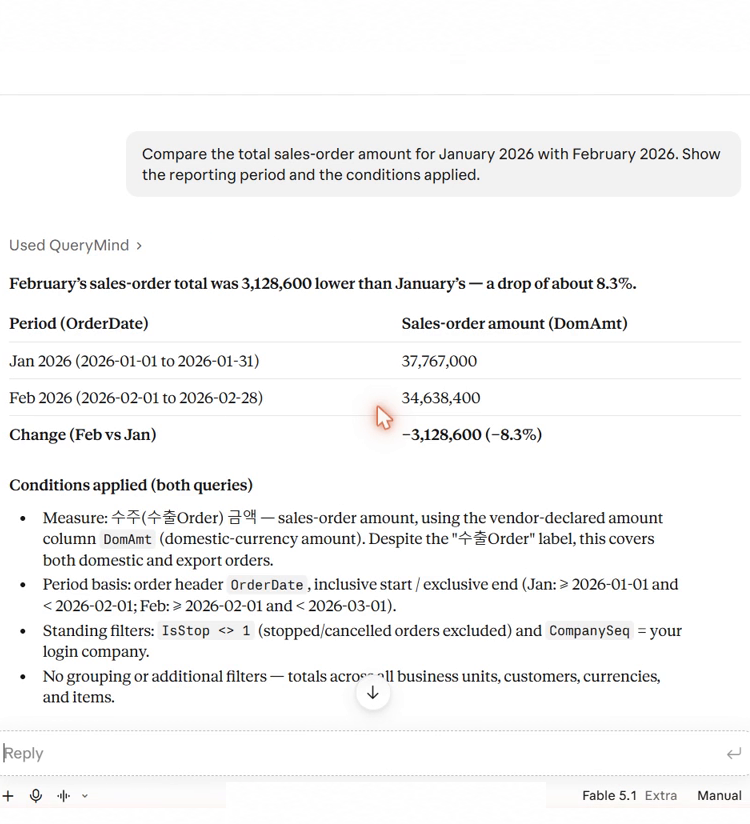
QueryMind returns the data and the conditions applied, and Claude chooses the tools and writes the response.
Recorded on 2026.11.08 with synthetic ERP data. Greetings, on-screen guidance around the edges, and waiting periods were edited out, while the question, tool calls, and responses were kept. The video length cannot be used to judge actual response time or speed differences.
This screenshot of the original Korean UI shows figures by department, the query SQL, and the evidence behind the answer. It is a separate demo of the underlying technology, using different data from the sales-order comparison.
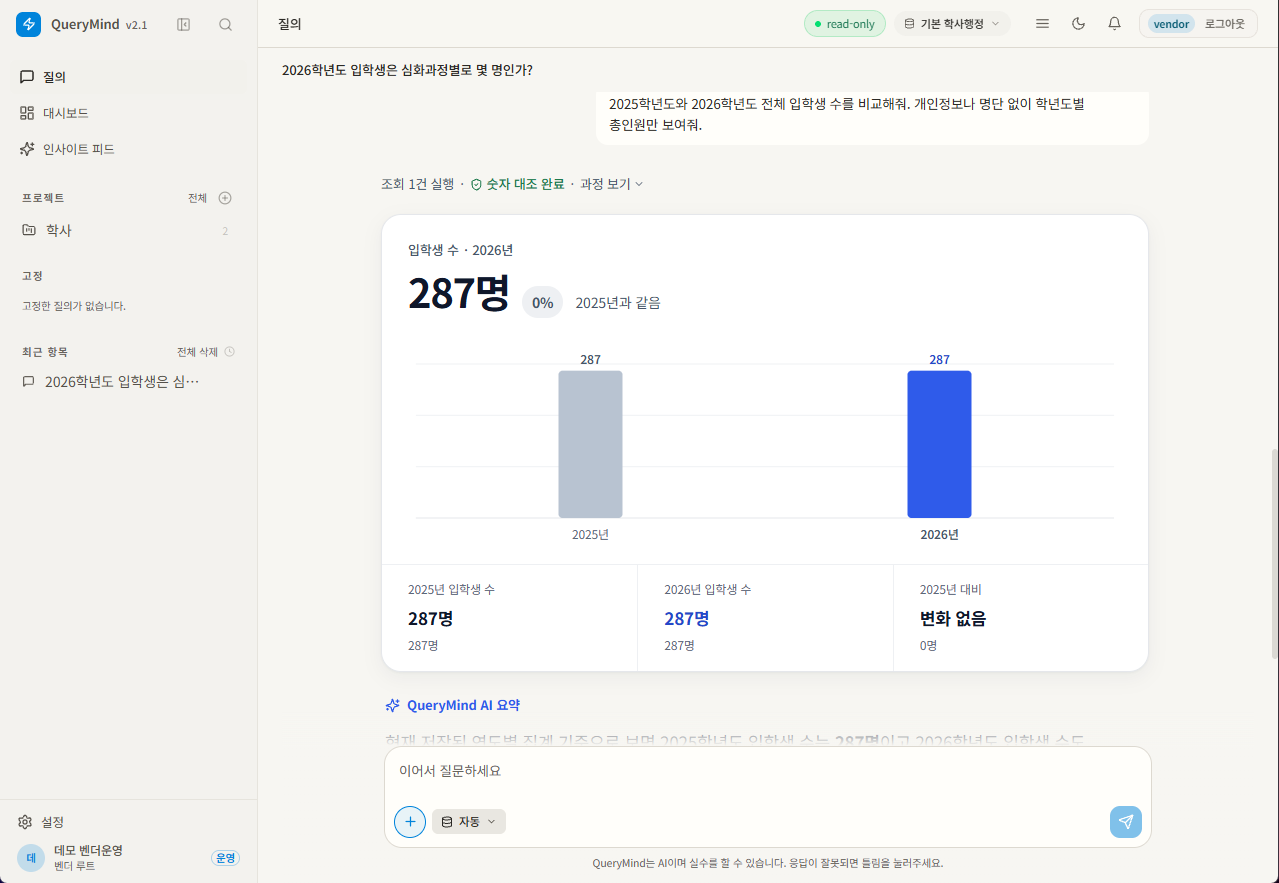
QueryMind business screen · a separately recorded demo of the underlying technology
The ERP demo uses synthetic data. The academic business screen is available under the ‘Academic screen’ tab.
Examples of the results you can get for each kind of business question. The actual scope depends on the connected data and your business definitions.
“Compare last month's and this month's sales-order amounts, and show the breakdown by customer too.”
What you can seeAmount by period · change and rate of change · breakdown by customer
“Compare each department's budget and spending on the same basis.”
What you can seeBudget and spending by department · comparison basis
“I'd like to see the query conditions and the SQL that was run for this answer.”
What you can seeQuery conditions · executed SQL · audit records
“Show the number of enrolled students by department and the enrollment-status criteria used for the count.”
What you can seeHeadcount by department · enrollment-status criteria used for the count
These are usage examples, not quotes from customer testimonials or deployment records.
Use 200 questions free each month, and top up credits when you need more.
No monthly subscription and no automatic payments.
1,000 credits
₩49,000KRW 49 per credit
A light start for business queries5,000 credits
₩199,000KRW 39.8 per credit
Everyday use across a team15,000 credits
₩499,000About KRW 33.3 per credit
Recurring data useChoose your AI to see the current connection steps.
Credit top-ups are being prepared. Final payment details, including tax and refund terms, will be published before billing begins. Fees for AI services such as ChatGPT and Claude are separate.
Install it on one PC and ask your company database questions. 14-day free trial.
Screens and answers are in Korean.
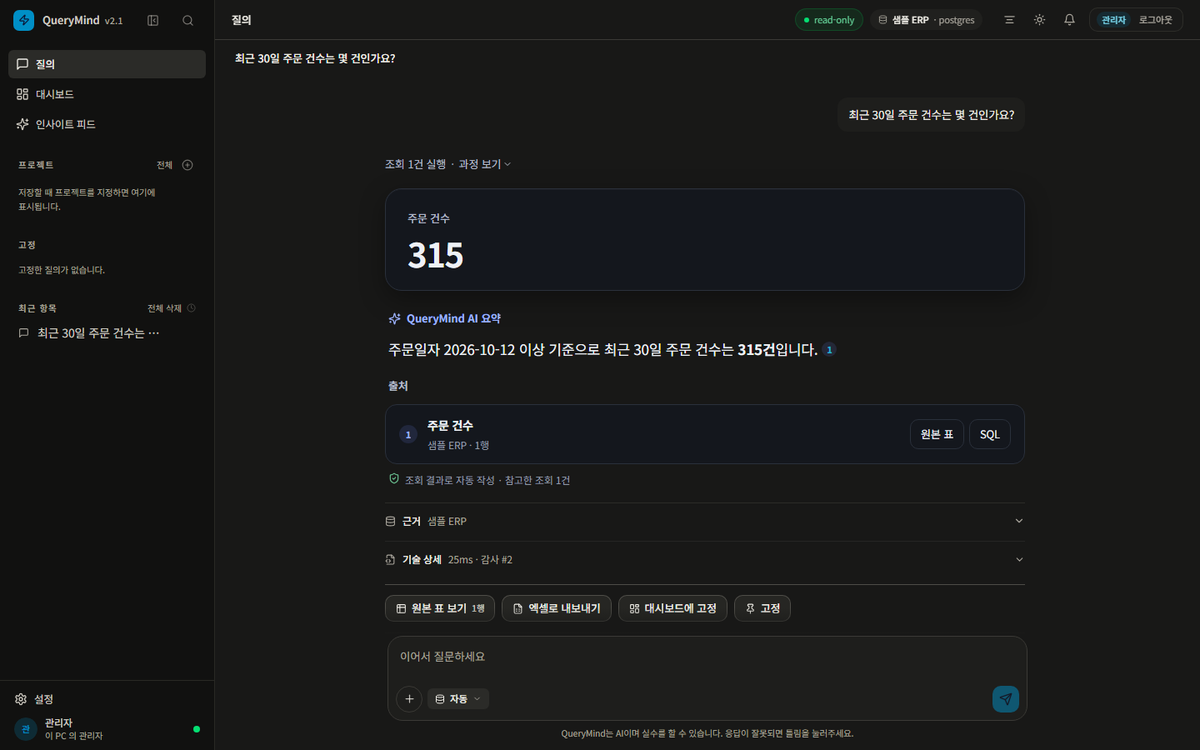
Deployed to fit your internal databases, security policies, network, and operating environment.
Yes. Choose the AI you want to use from the Get started buttons above, and we will show you the connection steps. For now, this uses each service's custom connection feature, and the available features and permissions depend on your account and organization settings.
No. Business databases are queried read-only, and no data is changed. The accounts, settings, and audit records needed to run the service are kept separately from the business database.
Yes. With Connect, the content needed for the answer, including your question and the query results, is sent to the AI you selected (ChatGPT or Claude). Organizations that restrict data from leaving their network should consider a separately scoped Enterprise or restricted-network deployment.
Each month, the 200 free questions are used first, and after that one credit is deducted for each question that receives a result. Clarifications, refusals, failures, and queries that return no rows are not charged. Top-up payments are currently being prepared.
Under the top-up plan being prepared, purchased credits do not expire. Refund conditions and how to request a refund will be announced once the payment terms are finalized.
This is reviewed as a separate deployment. After checking your network policy, server and model requirements, and data structure, we propose a deployment approach. The deployment method and billing structure differ from Connect.
QueryMind is an AX product that connects company data to ChatGPT and Claude and helps teams bring AI into everyday business work. It queries the current state of the business according to your access permissions and your company's business criteria, and compares changes across periods or the breakdown by item. You can also review the query conditions and SQL used in each answer.
Tell us the business questions your team wants AI to answer and the data you want to connect. blueurban will walk you through the connection steps, deployment scope, and what to prepare.